
-
Register Now for a Free Account!Unlock additional site access with your free account today, takes less than a minute, and guaranteed no spam - ever. Register Now!
Caribbean Cruise Region Webcams - Port, Beach, & Vacation Destination Cameras - Cruising Earth
Cruise Region Webcams - Caribbean
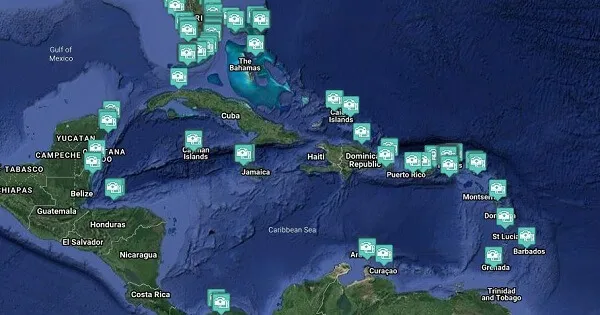
Caribbean Cruise Region Port Webcams
Caribbean port webcams place you right in the heart of classic tropical cruising with their signature turquoise bays, palm-fringed beaches, and relaxed island energy.
Cameras show ships anchoring in protected harbors like those in St. John or Cozumel, where tender boats ferry passengers to white-sand shores lined with beach bars and colorful towns. You’ll watch the gentle movement of clear Caribbean water lapping against the docks, local sailboats drifting past, and the bright, vibrant colors of waterfront life under constant sunshine.
The webcams capture the easy rhythm of island days — from peaceful early mornings to lively midday activity and glowing sunset sail-aways. These views deliver the exact feeling of paradise that defines Caribbean cruising and nothing else.
These live webcams give you a real-time feel for the atmosphere, weather, and daily rhythm across the entire Caribbean Cruise Region and are perfect for planning your next trip or enjoying a virtual escape.
Caribbean Cruise Region Quick Facts
- Key Cruising Sub-Regions: Eastern Caribbean, Western Caribbean, Southern Caribbean
- Best Time to Cruise: November to April (dry season with warm weather and lower hurricane risk)
- Signature Experiences: Snorkeling and diving on vibrant coral reefs, relaxing on pristine white-sand beaches, exploring historic colonial architecture and ancient ruins, immersing in lively island cultures, music and cuisine
- Typical Cruise Lengths: 4 to 8 night itineraries
Port Webcams Search
- Hopkins Inn and Day Spa, Hopkins Village, Belize
- Rotating Live Cameras Around Barbados
- Grand Park Royal Resort, Cancún, Mexico
- Hard Rock Hotel, Cancún, Mexico
- Hotel Park Royal Beach, Cancún, Mexico
- Hyatt Ziva Resort, Cancún, Mexico
- Live Aqua Beach Resort, Cancún, Mexico
- The Royal Cancún, Cancún, Mexico
- The Royal Haciendas Resort, Cancún, Mexico
- Bengal House, Abaco, Bahamas
- Calypso Beach, Hope Town, Abaco, Bahamas
- Green Turtle Club Resort & Marina, Abaco, Bahamas
- Port of Cozumel, Cozumel, Mexico
- Presidente Intercontinental Resort, Cozumel, Mexico
- Puerta Maya Cruise Center, Cozumel, Mexico
- Puerto Maya Cruise Port, Cozumel, Mexico
- Diamond Rock, Le Diamante, Martinique
- North Terminal Pier, George Town, Grand Cayman
- Pier Shopping Court, George Town, Grand Cayman
- Seven Mile Beach - North, Grand Cayman, Cayman Islands
- Seven Mile Beach - South, Grand Cayman, Cayman Islands
- South Terminal Pier, George Town, Grand Cayman
- Tender Boat Cruise Pier - North, George Town, Grand Cayman
- Tender Boat Cruise Pier - West, George Town, Grand Cayman
- Grand Turk Cruise Center, Grand Turk, Turks & Caicos Islands
- Royal Turks & Caicos Golf Club, Grace Bay, Turks & Caicos
- The Somerset on Grace Bay, Grace Bay, Turks & Caicos
- Villa Renaissance Resort, Grace Bay, Turks & Caicos
- Soggy Dollar Beach Bar, Jost Van Dyke, B.V.I.
- White Bay, Jost Van Dyke, B.V.I.
- Barbican & East Kings House, Kingston, Jamaica
- Cross Roads, Kingston, Jamaica
- Devon House Mansion, Kingston, Jamaica
- Downtown Kingston, Kingston, Jamaica
- Flat Bridge Historic Landmark, Spanish Town, Jamaica
- Half Way Tree Clock, Kingston, Jamaica
- Kingston Harbour, Kingston, Jamaica
- West Parade & West Queen, Kingston, Jamaica
- Lovell Bay, St. Vincent and the Grenadines
- Sorobon Beach, Bonaire, Netherland Antilles
- Grand Palladium Infinity Pool, Lucea, Jamaica
- Grand Palladium Resort, Lucea, Jamaica
- Las Brisas Beach Cove, Lucea, Jamaica
- Rick's Cafe, Negril, Jamaica
- Sallaby Mall, Little London, Jamaica
- Baha Mar Resort, Nassau, Bahamas
- Port & Paradise Island, Nassau, Bahamas
- Port of Nassau, Nassau, Bahamas
- Bucuti Beach, Aruba
- Costa Linda Beach Resort, Oranjestad, Aruba
- Playa Linda Beach Resort, Oranjestad, Aruba
- Port Aruba (Oranjestad)
- Playa del Carmen Beach - North, Playa del Carmen, Mexico
- Playa del Carmen City, Playa del Carmen, Mexico
- Pointe-a-Pitre Coastline, Guadeloupe
- Coco View Resort - North, Roaton, Honduras
- Coco View Resort - South, Roaton, Honduras
- Mahogony Bay Cruise Center, Roatan, Honduras
- Roatan Divers, Roaton, Honduras
- Puerto Del Rey Marina, Fajardo, Puerto Rico
- Wyndham Grand Rio, Río Grande, Puerto Rico
- Cabarete Beach, Dominican Republic
- Grand Paladium Beach, Punta Cana, Dominican Republic
- Hard Rock Hotel, Punta Cana, Dominican Republic
- Flamand Beach, St. Bart's, French West Indies
- Gustaf III Airport, St. Bart's, French West Indies
- Gustavia Harbor, St. Bart's, French West Indies
- Buccaneer Beach and Golf Resort, St. Croix, USVI
- Caravelle Hotel, Cristiansted, St. Croix, USVI
- Company House Hotel, Cristiansted, St. Croix, USVI
- Cristiansted Harbor, Cristiansted, St. Croix, USVI
- The Palms, Cristiansted, St. Croix, USVI
- Dive Grenada Scuba Center, St. Georges, Grenada
- Coral Bay, St. John, USVI
- Cruz Bay & Lovango Cay, St. John, USVI
- Cruz Bay Ferry Dock, St. John, USVI
- Cruz Bay Ferry, St. John, USVI
- Cruz Bay, St. John, USVI
- Hart & Rendezvous Bay, St. John, USVI
- La Jolla Caribe, St. John, USVI
- The Beach Bar Panorama, St. John, USVI
- The Beach Bar Stage, St. John, USVI
- The Beach Bar, St. John, USVI
- Airport & Beach, St. Maarten, Netherland Antilles
- Great Bay Beach, St. Maarten, Netherland Antilles
- Simpson Bay Beach, St. Maarten, Netherland Antilles
- Honeymoon Beach, St. Thomas, USVI
- Port of St. Thomas, St. Thomas, USVI
- Sapphire Beach, St. Thomas, USVI
- Hidden Treasure, Anegada, B.V.I.
- Saba Rock, Virgin Gorda, B.V.I.
- Scrub Island Resort, Scrub Island, B.V.I.
Belize City, Belize
Bridgetown, Barbados
Cancún, Mexico
Castaway Cay, Bahamas
Cozumel, Mexico
Fort-de-France, Martinique
Grand Cayman, Cayman Islands
Grand Turk, Turks & Caicos Islands
Jost Van Dyke, British Virgin Islands
Kingston, Jamaica
Kingstown, St. Vincent and the Grenadines
Kralendijk, Bonaire
Montego Bay, Jamaica
Nassau, Bahamas
Oranjestad, Aruba
Playa del Carmen, Mexico
Pointe-a-Pitre, Guadeloupe
Roatan, Honduras
San Juan, Puerto Rico
Santo Domingo, Dominican Republic
St. Barts, French West Indies
St. Croix, U.S. Virgin Islands
St. Georges, Grenada
St. John, U.S. Virgin Islands
St. Maarten, Netherland Antilles
St. Thomas, U.S. Virgin Islands
Virgin Gorda, British Virgin Islands
Webcam Images Update Automatically
Some ship webcams are live-streaming. Those that aren't live-streaming webcams display static images which are updated between once every 30 seconds to once every fifteen minutes. To make sure you don't miss any updates from the static image webcams we automatically look for a new image every 30 seconds. This will ensure you always have the latest image without having to manually reload/refresh any page.
Reporting A Broken Webcam
At the bottom of each ship webcam & port webcam page you will find a button to "Report No Webcam Image." Clicking the button will automatically create and send an issue report for that specific webcam. It's that easy, and it will help us to keep all our webcams fully functioning.