
-
Register Now for a Free Account!Unlock additional site access with your free account today, takes less than a minute, and guaranteed no spam - ever. Register Now!
Cruising Earth
Cruise Region Webcams - Mexican Riviera
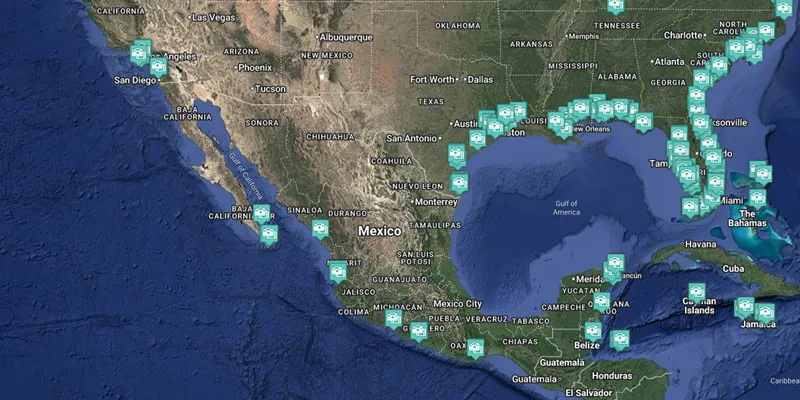
Mexican Riviera Cruise Region Port Webcams
Mexican Riviera port webcams showcase the sunny, colorful charm of Mexico’s Pacific coast with its golden beaches, dramatic cliffs, and lively waterfront towns.
Cameras capture ships arriving in harbors framed by palm trees, colonial-style buildings, and the iconic blue-and-white architecture of places like Cabo San Lucas or Puerto Vallarta. You’ll see the vibrant local life spilling onto the malecón, fishing boats returning with the day’s catch, and the classic Pacific swell rolling in against the shore.
The webcams highlight the warm golden light, the festive energy of seaside plazas, and the relaxed yet colorful Mexican coastal vibe that defines this cruising region.
These live webcams give you a real-time feel for the atmosphere, weather, and daily rhythm across the entire Mexican Riviera Cruise Region and are perfect for planning your next trip or enjoying a virtual escape.
Mexican Riviera Cruise Region Quick Facts
- Key Cruising Sub-Regions: Pacific Coast, Baja California, Riviera Maya
- Best Time to Cruise: November to April (dry season with warm weather)
- Signature Experiences: Relaxing on beautiful beaches, exploring colonial towns and ancient ruins, vibrant local markets and cuisine, water sports and marine life
- Typical Cruise Lengths: 4 to 7 night itineraries
Port Webcams Search
- Acapulco Bay - North, Acapulco, Mexico
- Acapulco Bay, Acapulco, Mexico
- Acapulco Marina, Acapulco, Mexico
- Cabo San Lucas Beach, Cabo San Lucas, Mexico
- Cabo San Lucas Harbor, Cabo San Lucas, Mexico
- Cabo San Lucas Port, Cabo San Lucas, Mexico
- La Paz Beach, La Paz, Mexico
- Mazatlan Beach, Mazatlan Mexico
Acapulco, Mexico
Cabo San Lucas, Mexico
La Paz, Mexico
Mazátlan, Mexico
Webcam Images Update Automatically
Some ship webcams are live-streaming. Those that aren't live-streaming webcams display static images which are updated between once every 30 seconds to once every fifteen minutes. To make sure you don't miss any updates from the static image webcams we automatically look for a new image every 30 seconds. This will ensure you always have the latest image without having to manually reload/refresh any page.
Reporting A Broken Webcam
At the bottom of each ship webcam & port webcam page you will find a button to "Report No Webcam Image." Clicking the button will automatically create and send an issue report for that specific webcam. It's that easy, and it will help us to keep all our webcams fully functioning.