
Midtown - Northwest, Anchorage, Alaska Camera
Midtown - Northwest, Anchorage, Alaska Live Streaming Camera
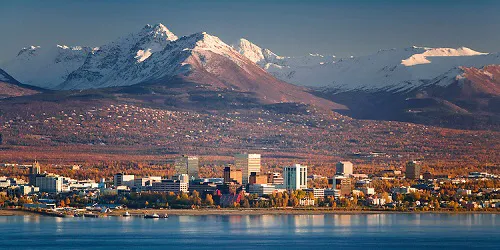
Live camera view of Midtown Anchorage pointed Northwest. Downtown Anchorage and city skyline can be seen in the distance. Cook inlet and Knik arm are in the background along with Mt. McKinley.
Camera Location Date / Time:
Thu September 24, 2026 5:12 AM AKDT
Additional Webcams Nearby
| Port Webcam | Distance |
|---|---|
| Midtown - Northeast, Anchorage, Alaska | 0.01 miles (NE) |
| Midtown - Southeast, Anchorage, Alaska | 0.02 miles (SE) |
| Town Square Downtown, Anchorage, Alaska | 1.44 miles (N) |
| Downtown - East, Anchorage, Alaska | 1.47 miles (N) |
| Mount Susitna, Anchorage, Alaska | 1.61 miles (N) |
| Whittier Harbor - West, Whittier, Alaska | 49.21 miles (SE) |
| Whittier Harbor - East, Whittier, Alaska | 49.22 miles (SE) |
| Port of Whittier, Whittier, Alaska | 49.59 miles (SE) |
Midtown - Northwest, Anchorage, Alaska Camera Location
Zoom In/Out On The Map Above To View Camera Location In Relation To The Port
Anchorage, Alaska Current Weather Conditions

View Port of Anchorage, Alaska Ship Traffic Live Now!
View live ship traffic for Port of Anchorage, Alaska on the interactive ship tracker, along with port details, current weather and nearby ports.
Webcam Images Update Automatically
Some port webcams are live-streaming. Those that aren't live-streaming webcams display static images which are updated between once every 30 seconds to once every fifteen minutes. To make sure you don't miss any updates from the static image webcams we automatically look for a new image every 30 seconds. This will ensure you always have the latest image without having to manually reload/refresh any page.
Webcam Images May Not Always Be Available
If an image appears old, incomplete, black, or missing, it's almost always due to an issue at the webcam source, which is beyond our control. The image will return automatically once the webcam is back online. If you see a completely black image for an extended time and the ship is an area where it is daytime, feel free to report it below. Your report helps us stay on top of problem webcams.
Thank you for helping us keep the webcams working properly!