
-
Register Now for a Free Account!Unlock additional site access with your free account today, takes less than a minute, and guaranteed no spam - ever. Register Now!
Cruising Earth
Cruise Region Webcams - Pacific Ocean
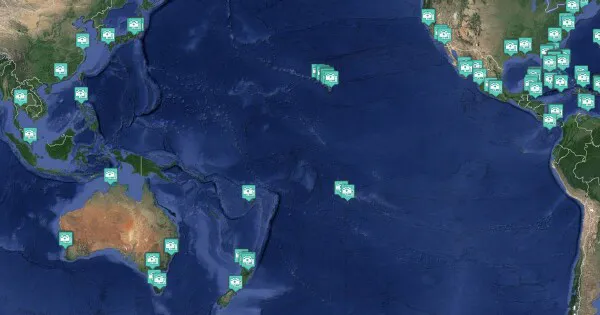
Pacific Ocean Cruise Region Port Webcams
Pacific Ocean port webcams capture the vast, varied island paradise of the Pacific with its volcanic landscapes, coral reefs, and relaxed oceanic lifestyle.
Cameras show ships arriving in turquoise lagoons surrounded by palm-fringed atolls or dramatic volcanic peaks. You’ll see the gentle sway of outrigger canoes, the crystal-clear water revealing reefs below, and the laid-back island harbors where life moves at a slower pace.
The webcams reveal the incredible range of Pacific scenery — from black-sand beaches to lush green mountains rising straight from the sea. These live views embody the remote, dreamy escape that only Pacific cruising delivers.
These live webcams give you a real-time feel for the atmosphere, weather, and daily rhythm across the entire Pacific Ocean Cruise Region and are perfect for planning your next trip or enjoying a virtual escape.
Pacific Ocean Cruise Region Quick Facts
- Key Cruising Sub-Regions: South Pacific, Hawaii, French Polynesia, Transpacific crossings
- Best Time to Cruise: Year-round (peak April to October for South Pacific)
- Signature Experiences: Tropical island and atoll exploration, coral reef snorkeling and diving, remote beach relaxation, Polynesian culture and traditions
- Typical Cruise Lengths: 7 to 21 night itineraries (including long crossings)
Port Webcams Search
- Auckland Harbour, Auckland, New Zealand
- Takapuna Beach, Auckland
- Castaway Island Beach, Fiji
- Lomani Island Resort, Fiji
- Plantation Island Beach, Fiji
- Port of Lyttelton, Christchurch, New Zealand
- Taylor's Mistake - East, Christchurch, New Zealand
- Taylor's Mistake - Southwest, Christchurch, New Zealand
- Bay Skate & Napier Beach, Napier, New Zealand
- North Coastline in Napier, New Zealand
- South Coastline in Napier, New Zealand
- Fa'a'ā Airport, Tahiti, French Polynesia
Auckland, New Zealand
Castaway Island, Fiji
Christchurch (Lyttelton), New Zealand
Napier, New Zealand
Papeete (Tahiti), French Polynesia
Webcam Images Update Automatically
Some ship webcams are live-streaming. Those that aren't live-streaming webcams display static images which are updated between once every 30 seconds to once every fifteen minutes. To make sure you don't miss any updates from the static image webcams we automatically look for a new image every 30 seconds. This will ensure you always have the latest image without having to manually reload/refresh any page.
Reporting A Broken Webcam
At the bottom of each ship webcam & port webcam page you will find a button to "Report No Webcam Image." Clicking the button will automatically create and send an issue report for that specific webcam. It's that easy, and it will help us to keep all our webcams fully functioning.